
Virtual Group Greeting Cards
Free Group ECards
for Farewell
for Thank you
for Appreciation
for Office
for Retirement
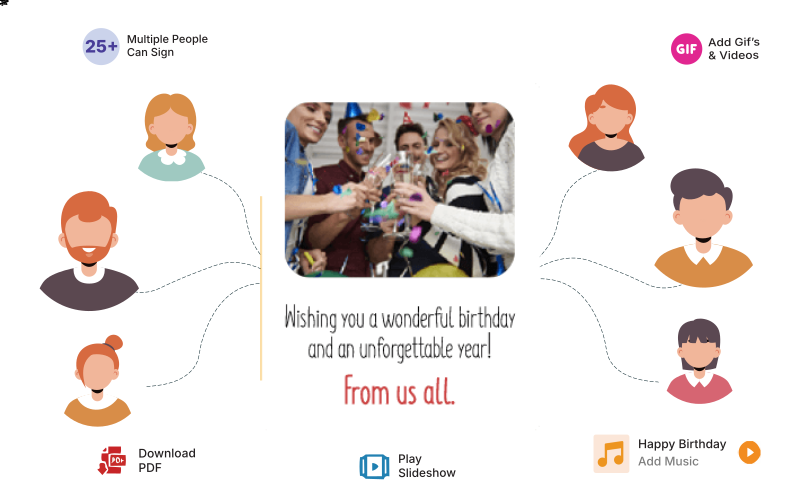
 Remote collaboration; Virtual card signing by unlimited people
 From birthdays to farewells, celebrate every moment together
 Advance scheduling, background music, & video download
Loved by 15 Million users worldwide
Sendwishonline empowers individuals, charities, and businesses to create secure, easy-to-use group eCards. Celebrate special milestones and stay connected with our seamless digital greeting platform.


















Group Card Occasions
Our platform offers 5,000+ digital group card designs to suit any workplace or corporate occasion.











How Group Cards Work?
Group eCards are an online replacement for greeting cards passed around your office for signatures. Virtual group cards are the best way to keep remote family, friends, and colleagues connected. Send online greeting cards in 3 easy steps!

Start a Group Card
Choose an ecard template, add occasion details, and pick a delivery time.

Get It Signed
Invite unlimited people to sign digitally with messages, photos, or videos.

Send It Over
Deliver via email, share the online card link, or play live during your event.
Why Use a Group eCard
Group eCards offer a fun, modern, and effortless way for teams, families, and friends to celebrate someone together. They bring everyone into one shared digital space, making the experience far more interactive than traditional paper cards or simple digital messages.
Below are the key features that make group eCards on Sendwishonline.com stand out.

Create and send a group eCard for free. No credit card required.

Change fonts, colors, and layouts so your eCard matches the occasion.

Download premium group eCards as PDFs to keep the memories forever.

Add background music and play the group card as a slideshow.

Never miss an important event. Schedule your ecard for future dates.

There is no limit to how many people can sign the card.

Upload photos or embed video links to make your group card more meaningful.

Share the card with a simple link via email, WhatsApp, Teams, or any other platform.


Group Cards Testimonies
Whether you're creating a group card for a coworker's birthday or a family member's anniversary. Check out the love we've received for our online group cards:
150 Coworkers Signed the Group Card
"You'll find beautiful cards with multiple categories with the best designs and lovely quotes. However, I uploaded my cover for special needs. The card was easy to share with my team via our internal portal. 150 staff members signed the card." – Layton Ward
Beautiful Birthday Group Cards
"I never leave reviews, but I'm super impressed with this website. I invited all my office colleagues to sign the virtual birthday card for my manager. During these remote times, this website virtually brings us together to share our feelings and thoughts." – Nate Adams
Best Virtual Farewell Cards for Colleagues!
"I remember when we carry farewell cards from one desk to another for signing. All the wait we do during the signature period is very pointless. Sendwishonline helped us to collaborate and sign our team cards virtually. Again, thanks a lot for this free and amazing website." – Cindy Lane
Very Nice Idea! Perfect Group Cards
"One of the easiest ways of sending free group eCards. Being an HR professional, these online free group eCards greatly help me. There is a wide range of high-quality cards for all business purposes. The quotes are written over the card, a more personal touch that the recipient appreciates." – Sean Powell
Use Cases: Online Group Cards
Are you wondering how group eCards fit into everyday workplace life? With online group cards, your team can collaborate from anywhere and still make people feel seen, valued, and celebrated. Here are some of the most common ways companies use virtual group cards:

Group Birthday Cards for Coworkers
Many employees spend a big part of their birthday at work, so it makes sense to make the day feel special.
Use group birthday cards to:
 Invite the whole team to sign one shared digital card
- Add personal messages, inside jokes, videos, photos, and GIFs
- Celebrate remote and hybrid teammate birthdays in the same way as in-office staff
- Keep everything organized in one place instead of scattered chats and emails
- Schedule the birthday card to arrive at the perfect time

Group Appreciation Cards
Appreciation keeps people motivated and loyal. Group cards make recognition easy and visible.
Use appreciation cards to:
- Thank teammates after big projects or tight deadlines
- Welcome new hires with warm messages from the whole team
- Celebrate promotions, achievements, and work anniversary milestones
- Boost morale during busy or stressful periods
- Highlight company culture and values through real messages from coworkers

Group Retirement Cards
Retirement is a big moment that deserves more than a quick email.
Use retirement group cards to:
- Collect memories and kind words from colleagues across teams and locations
- Add photos from past events, trips, and projects
- Give the retiree a digital keepsake they can download or print
- Show respect for their years of contribution in a visible way
- Include leadership messages alongside notes from peers

Group Farewell Cards
Goodbyes can feel awkward. A group card makes it easier for everyone to share how much someone meant to the team.
Use farewell cards to:
- Allow teammates to share stories, photos, and well wishes in one place
- Celebrate internal transfers, role changes, or relocations
- Stay connected with departing colleagues through a thoughtful final gesture
- Help quieter team members express their appreciation comfortably
- Preserve memories that the recipient can revisit anytime

Compare Plans & Features
Choose the right plan for your card. Looking for volume discounts? View Bundle Pricing.

Free
Ideal for Personal Cards
USD $0.00
- Schedule Card Delivery
- Play As Slideshow
- Select Background Music
- Up to 30 Signatures
- Wish Board View
- Wish Board PDF
- Download Card PDF
- Remove Ads
- Download Card Video
- Add Confetti
- Upload Company Logo
- Secure Card with Password
- Email Support
- Voice Message
- Video Messages
- Re-Order Messages

Premium Card
Best for Office Celebrations (Most Popular)
USD $2.99
- Schedule Card Delivery
- Play As Slideshow
- Select Background Music
- Unlimited Signatures
- Wish Board View
- Wish Board PDF
- Download Card PDF
- Remove Ads
- Download Card Video
- Add Confetti
- Upload Company Logo
- Secure Card with Password
- Email Support
- Voice Message
- Video Messages
- Re-Order Messages

Premium Plus
Perfect for Video Cards
USD $4.99
- Schedule Card Delivery
- Play As Slideshow
- Select Background Music
- Unlimited Signatures
- Wish Board View
- Wish Board PDF
- Download Card PDF
- Remove Ads
- Download Card Video
- Add Confetti
- Upload Company Logo
- Secure Card with Password
- Email Support
- Voice Message
- Video Messages
- Re-Order Messages
Group Card Questions
What is a group greeting card, and how is it different from other eCard websites?
A group greeting card is a digital eCard that can be signed by multiple people and is typically use for group wishes. You can schedule the delivery time in advance. It's like passing a big virtual card around the office. It's very useful when your team is working remotely.
How much does a group greeting card cost?
The group eCard is free to use and has no hidden costs. But we have some premium features, like logo upload and ad-free cards, are under paid cards.
How many free group eCards can I send?
There is no limit to the number of eCards you can send, although we have a daily limit of 10 eCards. This is to prevent people from abusing the free services and sending spam. If you're looking to send bulk eCards, check out our business version.
Is there a maximum number of people who can sign a group eCard?
There is no limit to the number of signatures on premium group cards.
How do I invite others to sign the group card?
Share the group eCard link via any message-sharing platform like WhatsApp, slack, teams, email, etc, or invite people within the application. Click "Invite contributors," and it will give you options.
How long is the group greeting card available?
The group eCard will be available online for one year from the delivery date. To keep it forever, you can download a PDF of premium cards.
Is the group greeting card private?
Those who have the group eCard link can access the eCard, but the eCard links are not searchable on the web. However, the eCards are not password-protected. You are responsible for whom you share the eCard with and how you share it (email, text, social media, etc.). But, in case of premium cards, you can make the signature on the card password protected.
Do I have to register an account to create the group card?
Yes, registration is important because you can edit or delete the group eCard and review the entries in the future. You can create an account or easily log in with your Google and Facebook accounts.
Do I need to register to sign the group greeting card?
No, registration is not required to sign the eCard. But it is good to register to edit the eCard later on.
What are the supported browsers?
Our supported browsers are Edge, Firefox, Safari, and Chrome. We do not support older versions of IE.
Can I print the group greeting card?
A PDF version of the group card will be available to download after the card has been delivered. Option of downloading PDF is only available for premium cards. For free group ecards upgrade is required.
Do we offer physical delivery of group cards?
No, we do not offer physical delivery of group cards. Cards are only available digitally on our website. But you can download pdf of premium cards.
Can I upload my custom cover?
Yes, you can upload your own card cover easily. The entire process is comfortabe for all.
I did not receive my group eCard. What can I do?
Sometimes, the email goes to the promotion or spam tab. Please check other tabs in case you haven't received the email. Sometimes companies have a firewall that blocks email. In this case, you can manually share the card link directly with the receiver.
Can I delete my group eCard after I create it?
Yes, you can delete it from your account. My account -> "Group card sent" -> Select your card -> Delete the card
How to delete entries in the group greeting card?
If a user creates substandard content during the signature, you can delete that entry from the eCard. Only the author of the eCard is allowed to delete the entry of the eCard.
How do I change the delivery date/time of the group card?
You can change the delivery date and / or time anytime before the eCard is sent by following these steps: Click on "Account" on the top right of the screen (must be logged in). Click "Group card sent" and select your card to edit, change the delivery date to a new date / time, and click the "Update Changes" button.
Can I get a refund after purchasing a card?
Your payment can be refunded within 14 days of purchase if the cards purchased are not used. If the card is already delivered or signed, due to the digital nature of the product, it can not be refunded. In case of issues related to payment, you can contact us at
How can I send bulk cards?
You can use our business portal to send bulk cards.
Why am I not able to download the PDF?
Download PDF is a premium feature and is only available on paid cards. In premium cards, PDF is only available after the card is delivered.