Categories
Birthday Announcement – Share Birthday News Online
- 1
- 2
- 3

With our thoughtfully designed free birth announcements invitation templates, creating an online invitation card for your upcoming celebration is quick and effortless. Just follow these simple steps:

Browse through hundreds of birth announcements invitation templates designed to suit both personal and professional occasions. PICK THE DESIGN that best fits your event.

Add all your event details directly in the CARD EDITOR. You can also include optional information such as the event schedule, gift registry, or photo gallery.

Set your RSVP preferences, PUBLISH your invitation, and share your LINK instantly with friends and family via email, social media, or messaging apps.
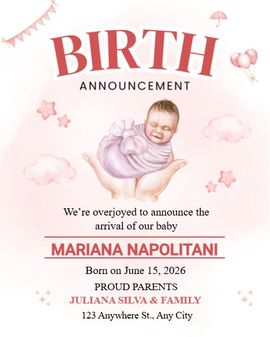
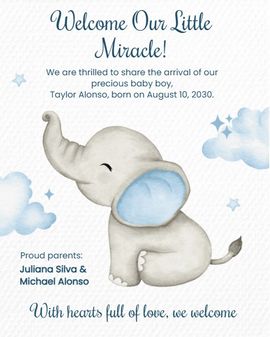
There is this moment, right after the whirlwind, where the room goes quiet, the world narrows to ten tiny toes, and your heart learns a new rhythm. It is that feeling your birth announcement will carry with it-not news, but more of a soft knock on the world's door, some way of saying, "They're here. Love, come closer."
Before fonts and photos, hold the mood you want to share: calm, wonder, a little stardust. Your announcement can be tender and simple-just a name, a date, and a line that sounds like you, a small story about the first time those fingers curled around yours. Whether you're writing for a far-flung family or neighbors who have been counting down with you, let your voice be the one they recognize from late-night texts and happy daydreams.
Keep it as clear and warm as you like: baby's name, birth date, time, weight/length if you wish. Add a tiny note about how all are doing. Oftentimes, you can just add that one sentence that epitomizes the moment: "We're learning each other's faces under soft morning light," or "Big sister is in charge of lullabies." Sharing widely? Keep it as minimal as you like-your love is the headline.
Think of design as a lullaby you can read. Soft neutrals, gentle pastels, or crisp black-and-white can all be beautiful, the space you leave for breath that makes it sing. One photo often says more than a collage. If you want to get a head start, a birth announcement template lets you try on looks in a hurry and find one that matches your family's heartbeat. Prefer playful minimalism? Choose clean typography and one teensy-weensy motif star, a sprig, a moon-so the focus stays on your little one's name.
Sleep is currency. Tools should respect that. If you're moving fast, a baby announcement template can help you fill in the essentials with grace, while a library of baby birth announcements offers styles for every vibe-classic, modern, whimsical, and faith-inspired. Working within a budget? A free birth announcement template gives you room to explore without pressure, and you can still add in the personal touches-a favorite line, a tiny nickname, a sweet detail about the day they arrived.
There's beauty in a card you can hold and tuck into an album. There's magic, too, in speed-the way a digital birth announcement can reach the grandparents before the kettle boils. You don't have to choose one forever; send digital first for the happy rush, then print keepsakes for fridges, frames, and memory boxes. And if privacy matters-and it so often does-share a smaller circle first, then widen the ripples when you're ready.
Your announcement can bring gentle guardrails that keep your new rhythm safe: "We're settling in slowly-visits by text, naps by instinct," or "Photos welcome; please skip sharing baby's full name online." People who love you will be thankful for clear cues. If you'd love practical help, add a tiny line-meal train link, preferred visiting hours, or "book instead of bouquet."
And the sweetest part of sending your news is what comes back. Encourage the wishes and messages from your circle-tiny notes you can reread at 3 a.m. with a warm blanket and sleepy smile. Designate a little spot for cards on your entry table; later, gather them into group cards so that all that love lives in one keepsake you can open on future birthdays and quiet winter mornings.
Birth Announcement Message Examples You Can Use
In the end, your announcement is just a tiny doorway you open with care. Whether you use a polished birth announcement template, a speedy digital birth announcement, a playful baby announcement template, a gallery of baby birth announcements, or a budget-friendly free birth announcement template, let the words sound like your home, gentle, specific, and true. Send what you can when you can. Love will meet you there, and it will continue to meet you, over and over, with every opening of your announcement, with every whisper of "Welcome, little one."
1. How do you announce a baby’s birth?
Announcing a baby’s birth can be done through birth announcement cards or digital messages. Include essential details like the baby’s name, birth date, weight, and any other details you wish to share. You can make it personal by adding a sweet message, such as “We’re overjoyed to welcome our little one, [Baby's Name], into the world!”
2. How do you announce a birth on social media?
When announcing a birth on social media, keep it simple but special. Post a photo of the baby along with a heartfelt message. Example: “Our hearts are full as we introduce [Baby's Name] to the world. Born [Birth Date], weighing [Weight], and measuring [Length].” You can also add a link to your baby announcement card if you created one on SendWishOnline.com.
3. How to word a birth announcement?
The wording of a birth announcement can be traditional or creative, depending on your style. Here’s a simple template:
“We are thrilled to announce the arrival of our beautiful baby [Name], born on [Birth Date], weighing [Weight] and measuring [Length]. Mommy and Daddy couldn’t be happier!”
Use SendWishOnline.com to create digital or physical announcements with your own personal message.
4. How do I announce my baby’s birth to my family on WhatsApp?
For WhatsApp birth announcements, keep it concise and joyful. You can send a quick message like:
“Hello everyone, we’re excited to share the arrival of our baby [Name]! Born [Birth Date], weighing [Weight], and healthy as can be. We can’t wait for you all to meet [him/her]!”
Feel free to attach a photo or digital announcement created through SendWishOnline.com for a more formal touch.
5. Can I create digital birth announcements on SendWishOnline.com?
Yes! SendWishOnline.com allows you to create digital birth announcements for free. Choose from a wide range of customizable templates, add your baby’s details, and instantly share the announcement with family and friends via a link, email, or social media.
6. Are birth announcements customizable on SendWishOnline.com?
Yes, our baby birth announcement templates are fully customizable. You can personalize text, colors, and photos to make your announcement uniquely yours. Choose a traditional style, modern look, or something in between!
7. How can I print my baby birth announcement from SendWishOnline.com?
Once you’ve personalized your baby birth announcement, you can download it as a high-quality PDF for printing. This allows you to send physical copies to those who may not be on social media.
8. Can I add a photo or video to my baby birth announcement?
Yes! SendWishOnline.com allows you to upload photos and videos to your birth announcement, making it even more special. You can also add a video message for a personal touch.